

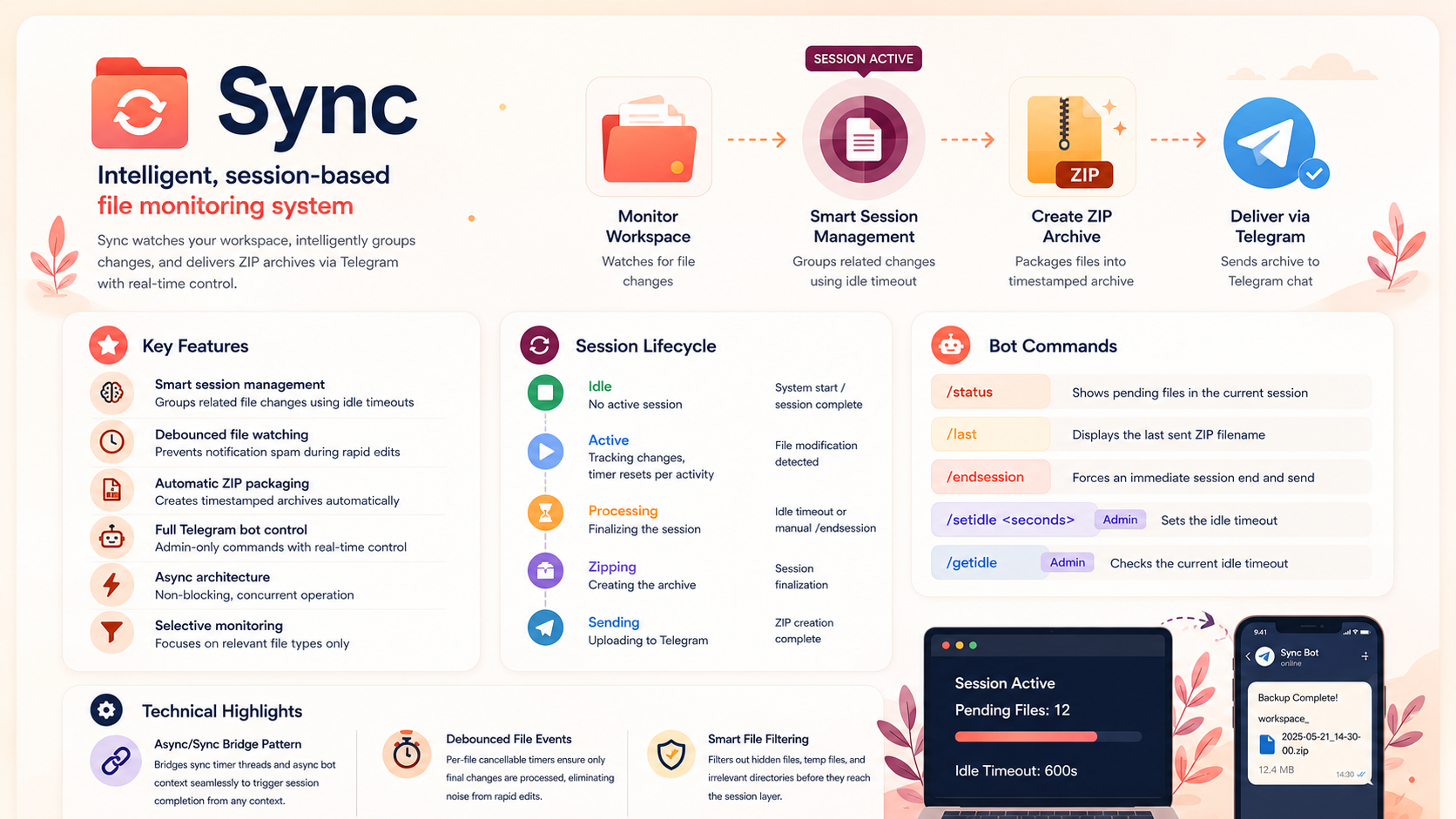
An intelligent, session-based file monitoring system that watches your workspace, groups related changes, and delivers ZIP archives via Telegram with real-time bot control.
Sync
An intelligent, session-based file monitoring system that watches your workspace, intelligently groups changes, and delivers ZIP archives via Telegram with real-time control.
About The Project
Sync is a file monitoring daemon that uses session-based bundling to automatically track, package, and deliver workspace changes via Telegram. It's well suited to automatic backups, homework submission, or lightweight collaborative workflows — instead of sending a notification per file edit, it groups related changes into a single session and ships one timestamped ZIP once activity settles down.
Key Features
- Smart session management that groups related file changes using configurable idle timeouts
- Debounced file watching to prevent notification spam during rapid edits
- Automatic ZIP packaging into timestamped archives
- Full Telegram bot control with admin-only commands
- Async architecture for non-blocking, concurrent operation
- Selective monitoring filtering to relevant file types (
.md,.pdf,.excalidraw)
Technology Stack
- Python 3.13+
- Watchdog (file system observation)
- Telegram Bot API
Architecture
The system runs two concurrent pieces from a single entry point: a background-threaded file watcher observing the target directory, and a blocking Telegram bot handling commands. File events pass through a type filter, then a debounce buffer, before being handed to a session manager that tracks changed files and resets an idle timer on every new change. Once the idle timeout expires (or a manual /endsession command fires), the session finalizes, the collected files are zipped into a timestamped archive, and the archive is delivered asynchronously over the Telegram Bot API.
Session Lifecycle
The session manager behaves as a small state machine:
| State | Description | Trigger |
|---|---|---|
| Idle | No active session | System start / session complete |
| Active | Tracking changes, timer resets per activity | File modification detected |
| Processing | Finalizing the session | Idle timeout or manual /endsession |
| Zipping | Creating the archive | Session finalization |
| Sending | Uploading to Telegram | ZIP creation complete |
Bot Commands
/status— shows pending files in the current session/last— displays the last sent ZIP filename/endsession— forces an immediate session end and send/setIdle <seconds>//getIdle— admin-only commands to adjust or check the idle timeout
Technical Highlights
Async/Sync Bridge Pattern
The session manager needs to trigger session completion from both a synchronous timer thread and an asynchronous bot context. It does this by attempting to grab the running event loop and scheduling a task if one exists, falling back to asyncio.run() if called from a plain timer thread — letting the same completion logic work correctly from either context.
Debounced File Events
Each file path gets its own cancellable timer: every new event on a path cancels the previous timer and starts a new one, so rapid successive edits to the same file only trigger a single downstream update once edits actually settle.
Smart File Filtering
Hidden files, temp files (trailing ~), and known cache/trash directories (like .obsidian, .trash) are filtered out before they ever reach the debounce or session layer, keeping noise out of delivered archives.
Problems Faced
-
Bridging Sync and Async Contexts : Python's timer threads are synchronous, but the Telegram bot and file delivery logic are asynchronous — triggering session completion correctly from either context required detecting whether an event loop was already running and branching accordingly.
-
Avoiding Notification Spam : Without debouncing, a single save could fire multiple file-system events in quick succession; per-path cancellable timers solved this without adding noticeable delay to genuine session updates.
-
Balancing Idle Timeout Against Usability : Picking a sensible default idle timeout (600 seconds) meant balancing "wait long enough that a real editing session isn't split into multiple ZIPs" against "don't make the user wait too long to get their backup."
Key Learnings
-
State Machines Simplify Concurrent Systems : Modeling the session lifecycle explicitly as Idle → Active → Processing → Zipping → Sending made it much easier to reason about what should happen when timers, file events, and bot commands all fire in overlapping ways.
-
Debouncing Is Essential for File-System Events : Raw file-system watcher events are noisy by nature; a debounce layer is effectively mandatory for any system that wants to react to "a user is done editing" rather than "a byte changed on disk."
-
Small Async Bridges Go a Long Way : A few lines of context-detection code (try
get_running_loop(), fall back toasyncio.run()) were enough to let the same business logic be triggered safely from completely different execution contexts.
What's Next
- A dashboard with session statistics
- Support for monitoring multiple vaults at once
- Cloud storage integration (S3, GCS)
- A web interface for configuration
- A file-type plugin system
- Configurable compression levels and optional encryption
- Scheduled, time-based backups in addition to idle-triggered ones